✨SALE✨ NuiNui - Avatar Texture Merge & UV Remap Tool
- ダウンロード商品¥ 350
🎉 Launch Celebration Sale 2026/08/28 (18:00) ~ 2026/09/10 (23:59) 500円 ▶ 350円 (150円 OFF) 👀일본어 영어 한국어 순으로 상품설명을 작성하였습니다. The product description was written in the order of Korean, English, and Japanese. 韓国語、英語、日本語の順で商品説明を記載しました。 [ ❗ 필수 설치 | Required installation | 必須インストール ] - Unity 2022.3.22f1 - VRChat SDK Avatars 3.10.0 ↑ - Liltoon Shader 2.3.4 ↑
🎬 Youtube Guide
- V1 _ Multi Cloth : https://youtu.be/p5zqpyWAPqM - V2 _ Multi Hair : https://youtu.be/WPAhfOzUu5k
--- 日本語 ---
🧵 NuiNuiとは
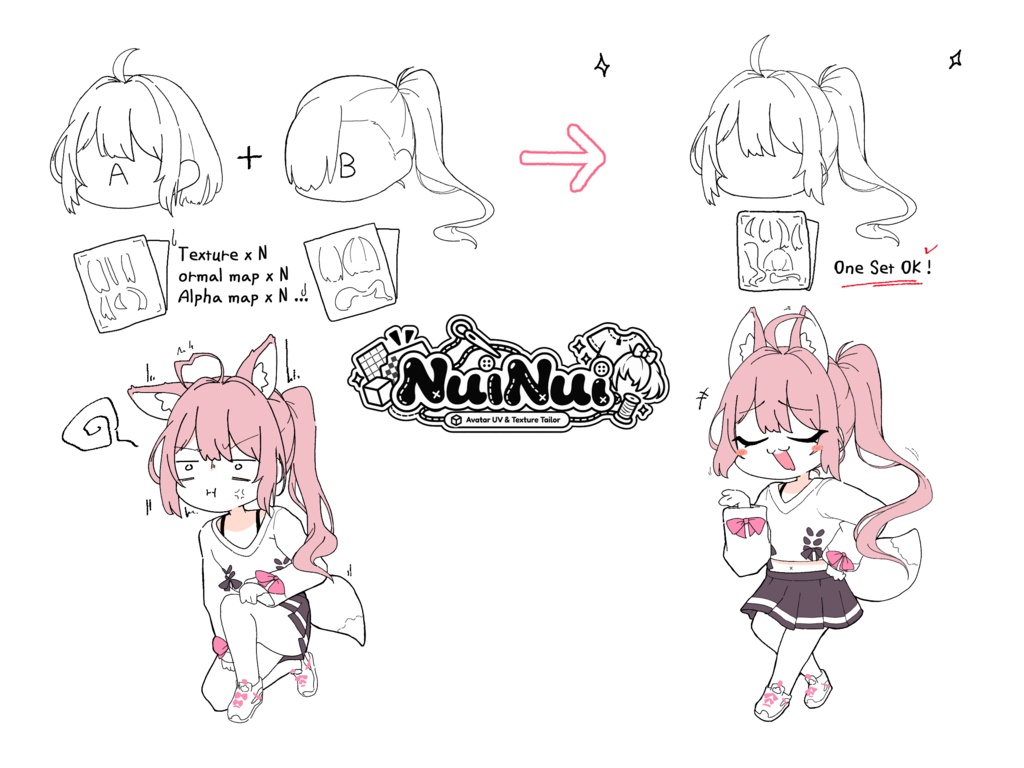
髪、服、アクセサリーアバターのUVとテクスチャを1つのアバターに統合するツールです。 A + Bの髪や服を組み合わせてもテクスチャが崩れず、アップロード時のテクスチャ容量の負担も軽減されます。
🙌 こんな方におすすめ
■ 複数のヘアアバターや服アバターを組み合わせてアバターをカスタマイズしている方 ■ 複数のアバターの服やアクセサリーのテクスチャを集めて軽く使いたい方 ■ 複数のアバターのテクスチャのうち、使用しない部分のUVを除外し、使用する部分だけを活用して汎用性を高めたい方 ■ 上記のようなケースを含めて、アバターを軽くしたい方
✨ 主な機能
■ テクスチャ自動統合 — 複数アバターのテクスチャ(メイン、ノーマル、アルファマップなど)を1つの統合されたテクスチャ(メイン、ノーマル、アルファマップなど)に自動統合 A + B + C 3枚のメインテクスチャ => ABC 1枚のメインテクスチャ A + B + C 3枚のノーマルマップテクスチャ => ABC 1枚のノーマルマップテクスチャ ■ UV自動再配置 — UV(テクスチャを3Dモデルに貼り付ける位置情報)を統合したテクスチャに合わせて自動で再配置、エッジの崩れを防止 ■ マテリアル自動生成 — 元のマテリアルを複製し、NuiNuiで統合されたテクスチャを自動で接続 (LilToon対応) ■ メッシュ生成 — 元のメッシュの形状を維持しながら、統合されたテクスチャに合わせてUV再マッピングされたメッシュを生成して接続 ■ 元のPhysBone維持 — PhysBoneとコライダーも自動で統合、パラメーター名の衝突も自動解決 ■ アバター保存 — NuiNuiで生成されたメッシュ、テクスチャ、マテリアル、プレハブを一括保存 ■ プレビュー — 統合前に3Dプレビューで結果を事前確認 ■ 除外テクスチャ選択 — 宝石など統合不要なテクスチャをチェックボックスで除外 ■ 多言語UI — 韓国語 / English / 日本語
📦 インストール方法
1️⃣ VCC/VPM CLIでVRChat SDK Avatars 3.0.0以上を先にインストール 2️⃣ NuiNui_v(バージョン).unitypackageをダブルクリック/Import
📝 使用方法
1️⃣ NuiNuiメニュー > Open NuiNuiでウィンドウを開く 2️⃣ Selectタブで統合するアバターをドラッグ&ドロップ 3️⃣ MergeタブでAnalyzeクリック → 統合結果プレビュー確認 4️⃣ Buildタブで出力フォルダ/名前を入力してMake Prefabクリック 詳細は同梱のREADMEまたはガイド動画を参照 🎬 ガイド動画: 『https://youtu.be/p5zqpyWAPqM?si=MhsTnKDkcXEROn5v』
⚠️ 注意事項
❗ 元のアバターは一切変更されません。すべての結果は新しいファイルとして作成されます。 ❗ 一度に統合するアバターの数が多すぎる場合やテクスチャを過度に統合する場合など、無理な統合は結果の品質が低下する可能性があります。 ❗ シェーダーによって統合できるテクスチャの種類が異なる場合があります。lilToonを推奨します。 ❗ 異なるシェーダーを使用するマテリアルは同じグループに統合されない場合があります。 ❗ 統合結果の品質は元のアバターのメッシュとUVの状態に依存します。 ❗ 座標によって決まるメインカラー2nd、3rdの場合は座標が異なることがあります。
📜 利用規約
✅ 正当な購入者間のデータ共有可能 🚫 本ツールの再販売・再配布禁止 🚫 非購入者へのファイル/リンク/一部データの共有禁止 🚫 NuiNuiで作成されたアバター等の出力物の権利は、使用された各オリジナルアセット制作者のライセンス条件に従います。 🚫 無断複製/転載/編集/修正/翻訳/リバースエンジニアリング/逆コンパイル禁止 🚫 著作権表示の削除/改変禁止 制作者: nl4514.dev@gmail.com 本製品の使用によって生じた損害/トラブルについて制作者は責任を負いません。
--- ENG ---
🧵 What is NuiNui?
A tool that merges the UVs and textures of hair, clothes, and accessory avatars into one avatar. Even when combining hair or clothes from Avatar A + B, textures won't break and the texture size burden during upload is reduced.
🙌 Recommended for
■ For those who are customizing their avatars by combining various hair avatars or clothing avatars ■ For those who want to casually use a collection of various avatar clothes and accessory textures ■ For those who want to increase versatility by removing UV from unused parts of various avatar textures and using only the usable parts ■ For those who want to lighten their avatar, including cases like the above
✨ Key Features
■ Auto texture merge — Automatically combines textures (main, normal, alpha map, etc.) from multiple avatars into one merged texture (main, normal, alpha map, etc.) A + B + C 3 main textures => ABC 1 main texture A + B + C 3 normal map textures => ABC 1 normal map texture ■ Auto UV remap — UV (the mapping that places textures onto a 3D model) is automatically repositioned to fit the combined texture, preventing edge bleeding ■ Material auto-generation — Clones original materials and auto-connects NuiNui merged textures (LilToon supported) ■ Mesh generation — Preserving the original mesh shape, creates a UV-remapped mesh to fit the merged textures and links it ■ Original PhysBone maintained — PhysBones and colliders are also auto-merged, with automatic name conflict resolution ■ Avatar save — Save NuiNui-generated meshes, textures, materials, and prefab all at once ■ Preview — Check the combined result in 3D before building ■ Exclude texture selection — Use checkboxes to exclude textures that don't need merging (e.g. gems) ■ Multilingual UI — Korean / English / 日本語
📦 Installation
1️⃣ Install VRChat SDK Avatars 3.0.0+ via VCC/VPM CLI first 2️⃣ Double-click/Import NuiNui_v(version).unitypackage
📝 How to Use
1️⃣ Open NuiNui via menu > NuiNui > Open NuiNui 2️⃣ Select tab: drag and drop avatars to merge 3️⃣ Merge tab: click Analyze → check the combined preview 4️⃣ Build tab: enter output folder/name, click Make Prefab For details, see the included README or guide video. 🎬 Guide video: 『https://youtu.be/p5zqpyWAPqM?si=MhsTnKDkcXEROn5v』
⚠️ Notes
❗ Original avatars are never modified. All results are created as new files. ❗ Merging too many avatars at once or combining too many textures may reduce the quality of the result. ❗ The textures that can be combined depend on the shader. lilToon is recommended. ❗ Materials using different shaders may not combine together. ❗ The quality of the combined result depends on the original avatar's mesh and UV condition. ❗ For the main colors 2nd and 3rd, which are determined by coordinates, the coordinates may differ.
📜 License
✅ Sharing data between legitimate purchasers allowed 🚫 Resale/redistribution of this tool prohibited 🚫 Sharing files/links/partial data with non-purchasers prohibited 🚫 Rights to avatars and outputs created with NuiNui are subject to the license terms of each original asset creator. 🚫 Unauthorized copying/reproduction/editing/modification/translation/reverse engineering/decompilation prohibited 🚫 Removing/altering copyright notices prohibited Creator: nl4514.dev@gmail.com The author is not liable for any damage or trouble caused by using this product.
--- 한국어 ---
🧵 NuiNui 소개
머리카락(Hair), 옷, 액세서리 아바타의 UV와 텍스쳐를 하나의 아바타로 합쳐주는 툴입니다. 여러 A + B 헤어 혹은 옷을 합쳐도 텍스처가 깨지지 않고, 업로드시 텍스쳐 용량 부담이 줄어듭니다.
🙌 이런 분에게 추천해요
■ 여러 헤어 아바타 혹은 옷 아바타를 조합하여 아바타를 꾸미고 계신 분 ■ 여러 아바타의 옷, 액세서리의 텍스쳐를 모아서 가볍게 사용하시고 싶은 분 ■ 여러 아바타의 텍스쳐중 안쓰는 부위의 UV를 제외하여 쓰는부분만 사용하여 활용성을 높히고 싶으신 분 ■ 위와같은 경우를 포함하여 아바타를 가볍게 만들고 싶으신 분
✨ 주요 기능
■ 텍스처 자동 합치기 — 여러 아바타의 텍스처(메인, 노멀, 알파맵 등)를 하나의 병합된 텍스처(메인, 노멀, 알파맵 등)로 자동 합침 A + B + C 3개의 메인 텍스쳐 => ABC 1개의 메인 텍스쳐 A + B + C 3개의 노멀맵 텍스쳐 => ABC 1개의 노멀맵 텍스쳐 ■ UV 자동 재배치 — UV(텍스처를 3D 모델에 입히는 위치 정보)를 합친 텍스처에 맞게 자동으로 재배치, 경계 깨짐 방지 ■ 마테리얼 자동 생성 — 원본 마테리얼을 복제하여 NuiNui로 합쳐진 텍스처를 자동으로 연결 (LilToon 대응) ■ 메시 생성 — 원본 Mesh의 형태를 유지하면서 합쳐진 텍스쳐에 맞게 UV 재매핑된 Mesh를 생성하여 연결 ■ 원본 PhysBone 유지 — PhysBone과 충돌체도 자동으로 합치고, 설정 이름이 겹쳐도 자동으로 해결 ■ 아바타 저장 — NuiNui로 생성된 메시, 텍스처, 마테리얼, 프리팹을 한 번에 저장 ■ 미리보기 — 합치기 전에 3D 미리보기로 결과를 미리 확인 ■ 제외 텍스처 선택 — 보석 등 합칠 필요 없는 텍스처는 체크박스로 빼기 ■ 다국어 UI — 한국어 / English / 日本語
📦 설치 방법
1️⃣ VCC/VPM CLI로 VRChat SDK Avatars 3.0.0 이상 먼저 설치 2️⃣ NuiNui_v(버전).unitypackage 더블클릭 / Import
📝 사용 방법
1️⃣ NuiNui 메뉴 > Open NuiNui로 창 열기 2️⃣ Select 탭에서 합칠 아바타 드래그앤드롭 3️⃣ Merge 탭에서 Analyze 클릭 → 합치기 결과 미리보기 확인 4️⃣ Build 탭에서 출력 폴더/이름 입력 후 Make Prefab 클릭 자세한 설명은 동봉 README 또는 가이드 영상 참고 🎬 가이드 영상: 『https://youtu.be/p5zqpyWAPqM?si=MhsTnKDkcXEROn5v』
⚠️ 주의 사항
❗ 원본 아바타는 전혀 변경되지 않습니다. 모든 결과는 새 파일로 만들어집니다. ❗ 한번에 병합하는 아바타의 양이 많거나 텍스쳐를 너무 많이 합성하는경우 등 무리한 병합은 결과물의 퀄리티가 떨어질 수 있습니다. ❗ 셰이더에 따라 합칠 수 있는 텍스처 종류가 다를 수 있습니다. lilToon을 권장합니다. ❗ 서로 다른 셰이더를 사용하는 마테리얼은 같이 합쳐지지 않을 수 있습니다. ❗ 합친 결과의 품질은 원본 아바타의 메시와 UV 상태에 따라 달라집니다. ❗ 좌표에 의해 결정되는 메인컬러2nd, 3rd 의 경우는 좌표가 달라질 수 있습니다.
📜 이용 규약
✅ 정당한 구매자 간 데이터 공유 가능 🚫 본 툴 재판매/재배포 금지 🚫 비구매자에게 파일/링크/일부 데이터 공유 금지 🚫 NuiNui로 제작된 아바타 등의 출력물의 권한은 사용된 각 원본 에셋 제작자의 라이선스 조건에 따릅니다. 🚫 무단 복제/전재/편집/수정/번역/역설계/역컴파일 금지 🚫 저작권 고지 삭제/변조 금지 제작자: nl4514.dev@gmail.com 본 제품 사용으로 인한 손해/트러블에 대해 제작자는 책임을 지지 않습니다.
Terms of Service
Terms : https://app.notion.com/p/TERMS-3bec2eac7a268044af03cc9fb08faee1?source=copy_link License : https://app.notion.com/p/MA-Menu-Wizard-License-3bec2eac7a2680e8bac3cd43e431dd0e?source=copy_link Readme : https://app.notion.com/p/README-3cac2eac7a2680bf8950e80cf346548f?source=copy_link
Update information
- v1.0.0 : Initial Release - v1.0.1 : Patch release with texture-atlas bug fixes and package export stability. - v1.0.2 : Patch release fixing multi-submesh mesh data loss, improving build performance, and adding tiled UV support. - v1.0.3 : Quality release fixing UV edge transparency and adding texture exclusion UI. - v1.0.4 : Performance release: atlas baking time reduced from ~12 minutes to ~3 minutes via texture caching. - v1.0.5 : UI/UX improvements and 3D preview stability release. - v 1.0.6 : Material connection stability and packing performance improvement release.